
Configuring the FTS Service
FTS (Flight Termination System) is used to remotely stop the aircraft motors and terminate flight in an emergency. The FTS service is provided separately from the main DJI FlightHub 2 installation package and is intended for on-premises deployments that require flight termination capabilities.
Service Architecture
The FTS motor stop link operates independently of the DJI FlightHub 2 service link. The two links use separate servers and account systems. FTS motor stop commands and execution results do not pass through AIO and do not depend on AIO remaining operational.
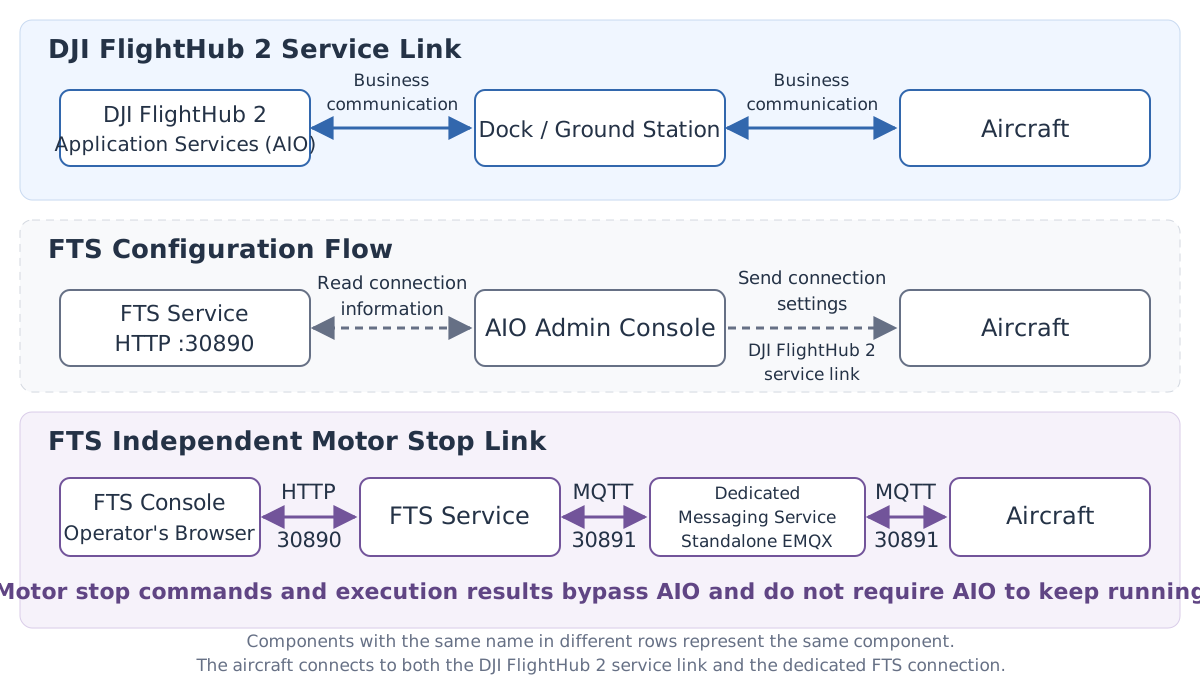
- DJI FlightHub 2 service link: Used for routine device management, flight control, and service data transmission.
- FTS configuration flow: AIO obtains connection information for the dedicated messaging service from the FTS service, then sends it to the aircraft through the FlightHub service link.
- FTS motor stop link: Operators initiate verification and motor stop operations through the FTS console. The FTS service communicates directly with the aircraft through the dedicated messaging service and returns execution results. The dock or ground station is not involved in this connection.
FTS runs independently through systemd and does not depend on the AIO Kubernetes cluster. It can be deployed on the same server as AIO or on a separate server. This independence applies to the services and logical links; whether the physical networks are independent depends on the on-site network deployment.
Preparation Before Configuration
Device and Server Requirements
| Item | Requirement |
|---|---|
| Supported devices | Aircraft connected through DJI Dock 3 or O4 Ground Station |
| Aircraft firmware | Version 18.0 or later |
| Operating system | Linux on amd64 or arm64 architecture, with systemd and root privileges |
| Server resources | At least 1 CPU core, 1 GiB of memory, and 2 GiB of disk space |
Network Requirements
| Port | Purpose | Accessed by |
|---|---|---|
| 30890 (HTTP) | FTS console and API | Operator browsers, AIO |
| 30891 (MQTT) | FTS dedicated messaging service | Aircraft, FTS service |
| 30892 | Internal messaging service management | Local access only |
Ensure that operator browsers and AIO can access port 30890 on the FTS server, and that aircraft can directly access port 30891.
Installation and Configuration
Installing the FTS Service
Select the installation package based on the target server's CPU architecture: fts-V<版本号>-linux-<amd64|arm64>.tar.gz.
The installation package contains the following:
| File or directory | Description |
|---|---|
fts-server | Main FTS service program |
emqx/ | FTS dedicated messaging service |
install.sh | Installation script |
uninstall.sh | Uninstallation script |
Extract the installation package on the server and run the installation script. Replace <版本号> and <arch> in the commands with the actual version and architecture:
tar -xzf fts-V<版本号>-linux-<arch>.tar.gz
cd fts-V<版本号>-linux-<arch>
sudo bash install.sh
The installation script deploys the FTS service and the dedicated messaging service, generates an account and password, and registers and starts the system services. After installation, the terminal displays the FTS console URL, login account, and password.
The login password is displayed only once during the first installation. Save it promptly.
Connecting to DJI FlightHub 2
- Go to the AIO Admin Console and open “FlightHub Management > Extension Services > FTS”.
- Enter the FTS console URL, login account, and password displayed after installation.
- Save the configuration and enable the FTS service.
Once enabled, the system activates FTS functionality and synchronizes the device list periodically, every 5 minutes by default. The system sends connection information for the dedicated messaging service to aircraft that meet the requirements. The aircraft use this information to establish an independent FTS connection.
Verifying the Service
Run the following command and confirm that both services are active (running):
systemctl status fts-server fts-broker
In a browser, open the console URL displayed during installation, such as http://<FTS服务器IP>:30890, and log in with the account and password generated during installation. After entering the console, test the connection to the target device.
Verifying the installation does not require stopping the motors.
Using FTS
FTS is used to terminate flight in an emergency. The aircraft loses power after its motors stop. Perform this operation only after confirming that flight termination is required.
Viewing FTS Information
In DJI FlightHub 2, view the target aircraft's FTS information, including its online status and verification code, under “Device Management > Device Maintenance”, in the device window, or in the Virtual Cockpit. The verification code can be copied, and the page refreshes automatically when it is updated.
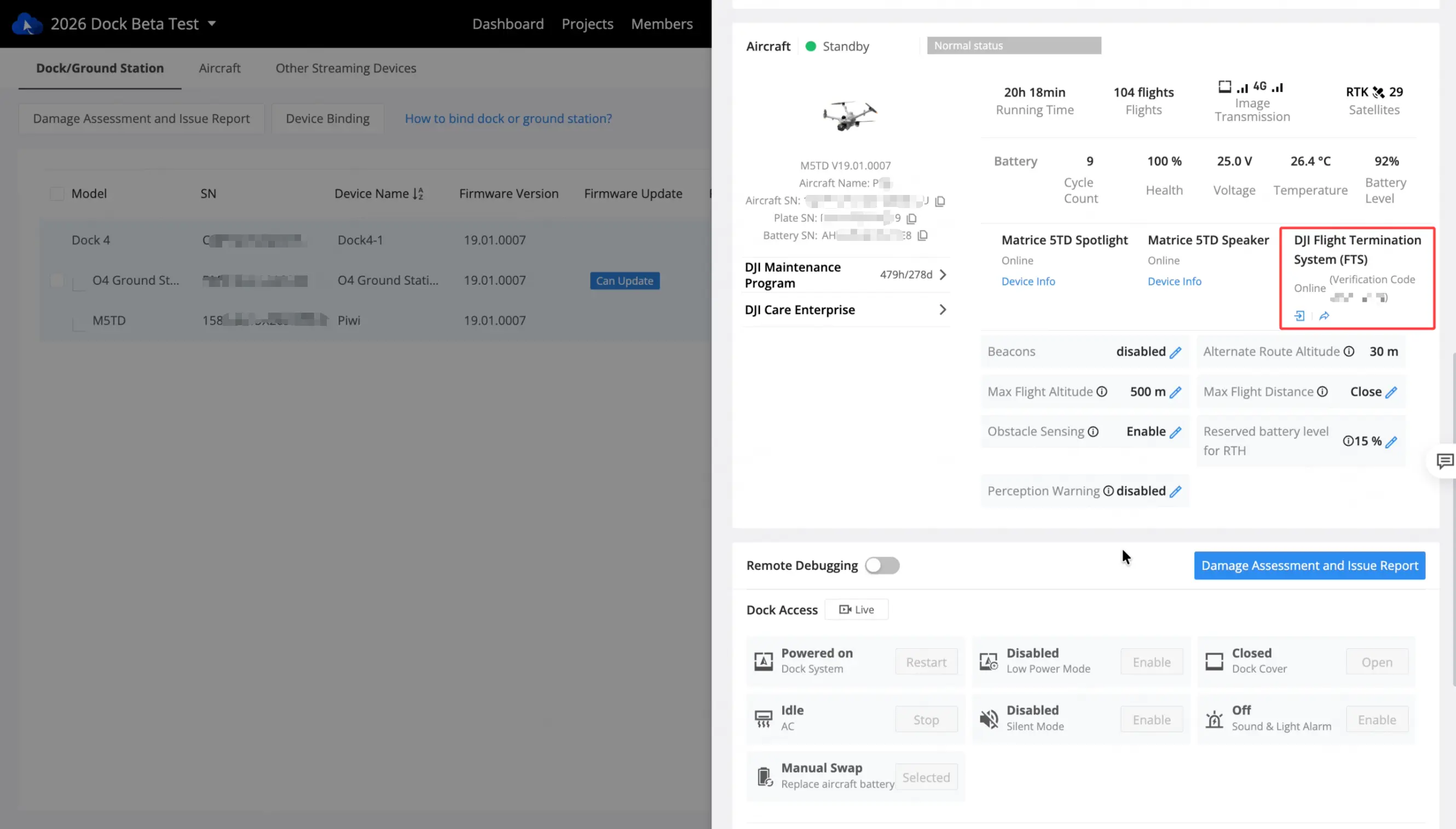
Check the target aircraft's SN and save its FTS verification code for device verification in the FTS console. The FTS verification code is different from the console login password.

Verification and Flight Termination
- Open the FTS console in a browser and log in with the account and password generated during installation.
- Check the target aircraft's SN and initiate device verification using its FTS verification code.
- After verification succeeds, follow the console prompts to confirm flight termination.
- The FTS service sends the command to the aircraft through the independent motor stop link, and the console displays the execution result returned by the device.
Uninstallation and Reinstallation
Go to the directory where the FTS installation package was extracted and run the uninstallation script:
sudo bash uninstall.sh
Uninstallation removes the FTS service, program files, and the generated account and password. Reinstallation generates a new account and password. Update the console URL, account, and password on the FTS configuration page in AIO, then save the configuration again and enable the service so that new connection information can be sent to the aircraft.