
FlightHub Configuration
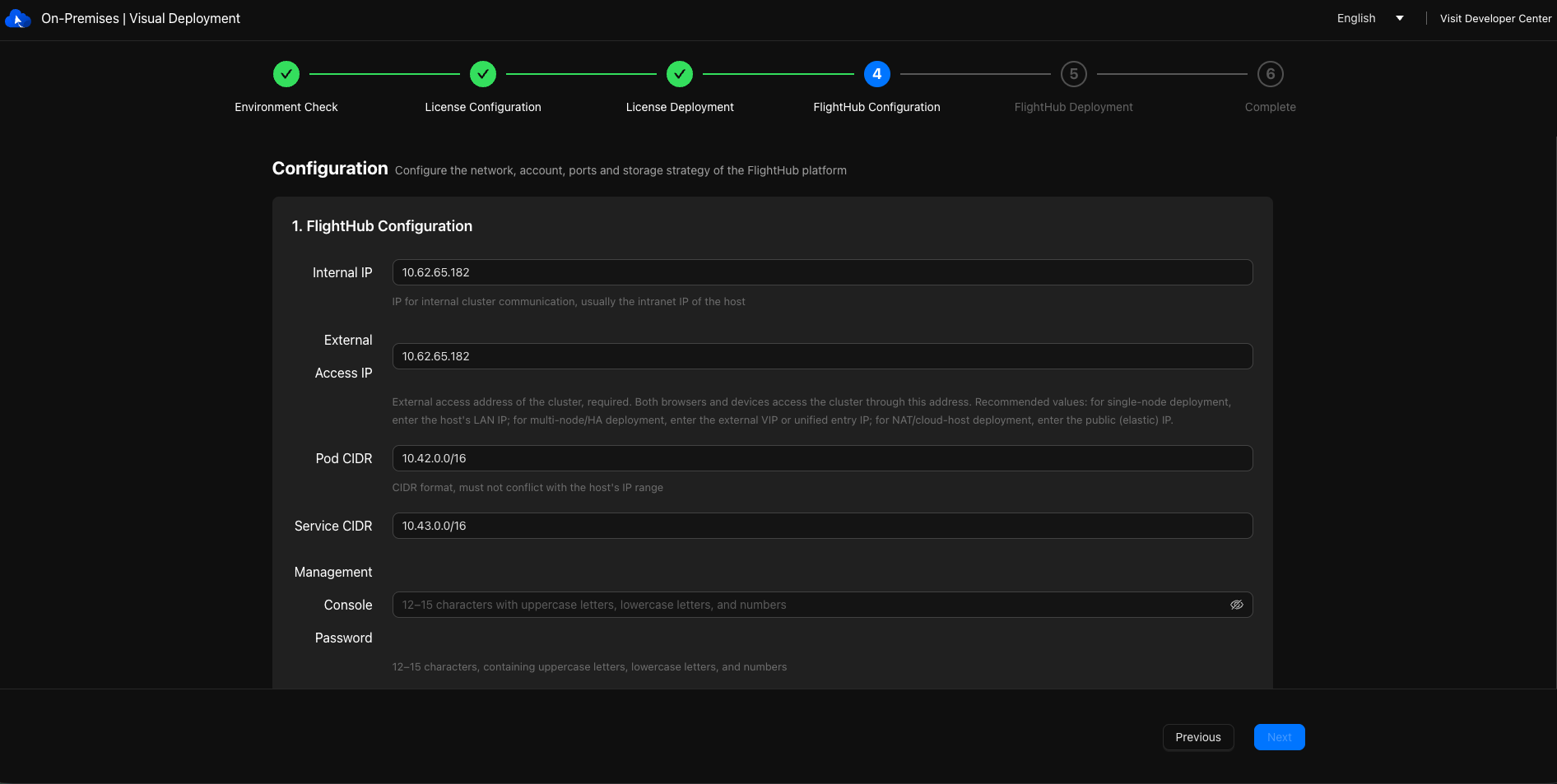
Configure the basic parameters for DJI FlightHub 2.
Limitations
The Admin Console uses the initial password set during installation. Keep it secure.
Data Root Directory
- Use an absolute path. Critical system directories such as
/,/boot,/proc, and/sysare not allowed. - Use a persistent filesystem. Temporary or overlay filesystems such as tmpfs and overlay are not allowed.
- At least 200 GB of free space is required.
- The data root directory cannot be changed after installation. Confirm your disk layout before submitting.
- Use an absolute path. Critical system directories such as
If the internal IP is dynamically assigned by DHCP, the page displays a yellow warning but does not block deployment. An IP change may cause the node to lose connectivity. Assess this before proceeding.
Mask ranges for the Pod subnet and Service subnet:
- Pod subnet: /16–/18, supporting up to 16, 8, and 4 nodes, respectively.
- Service subnet: /12–/24. Configurations outside this range cannot pass validation.
The internal IP, external access IP, Pod subnet, and Service subnet must not overlap or conflict with other subnets or routes in the target machine's network.
If configurable ports conflict with other services on the target server, change them on this page before submitting. These conflicts cannot be deferred to the deployment stage.