
On-Premises Adaptive Network Function
The adaptive network feature is used to enable stable communication between devices and FlightHub services across networks and addresses in multi-NIC or cross-subnet scenarios.
Application Scenario
Note: Currently, only devices with on-premises cloud deployment are supported (third-party cloud deployment is not supported).
- FlightHub On-Premises deployment is completed, and the FlightHub page is accessible on the current network.
- The server (FH2 Server) offers multiple external access methods, including (some example scenarios):
- Multiple network cards or multiple external access methods (IP or domain name).
- Devices on different subnets need to connect to the same platform (cross-subnet access).
- Dock/manually controlled aircraft are located on a subnet different from the server and need to access FlightHub services. For example:
- A server in the office network (
10.66.x.x). - A newly added device subnet (
11.11.x.x) needs to communicate with existing services.
- A server in the office network (
Deployment Model
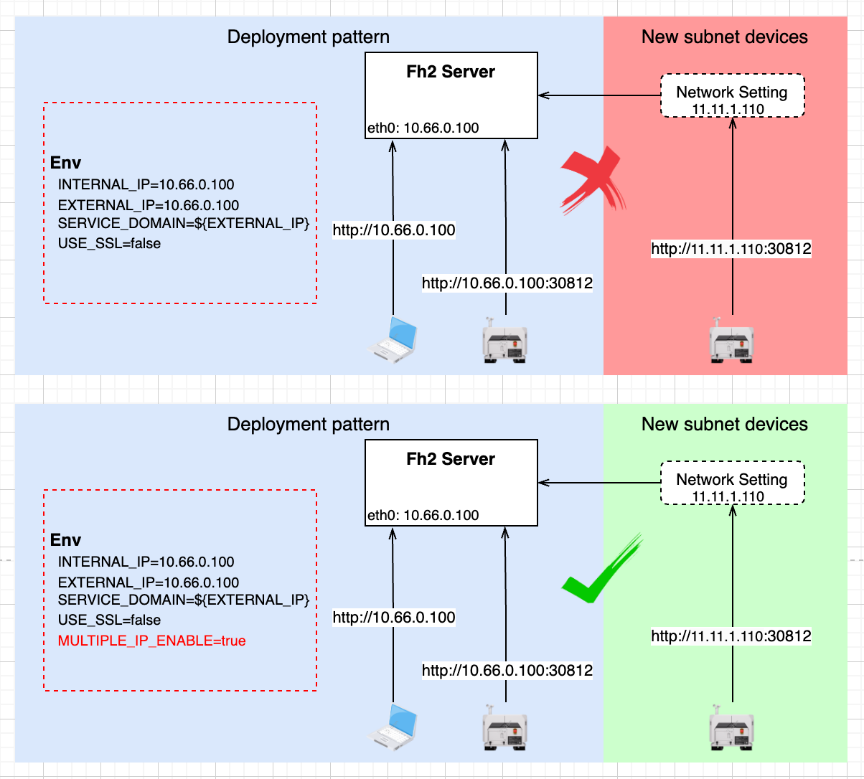
Configuration
Enabling the Adaptive Network Switch
Go to the AIO Management Backend. Path: 「FlightHub Management」→「FlightHub Configuration」→「Adaptive Network」. Set 「Enable」 to 「Yes」, as shown below. 
Note: This switch corresponds to MULTIPLE_ENABLE in the [Deployment Model diagram] above.
Additional Information
Due to device and feature iterations, the current adaptive network feature only supports Dock 3 and manually controlled aircraft (on-premises cloud deployment). To adapt to other models or cloud deployment methods, configure the 「Compatible Device List」 in the AIO Management Backend. Path: 「FlightHub Management」→「FlightHub Configuration」→「Adaptive Network」.
Example:
- Single device: Dock 2 (SN:
8UNX4) has a cloud IP of234.198.222.1. The configuration is:"8UNX4:234.198.222.1" - Multiple devices: Add another device (SN:
7IAUY, domain name:www.baidu.com) on top of the above. The configuration is:"8UNX4:234.198.222.1:7IAUY:www.baidu.com"
Attention: Use only half-width characters. Do not use Chinese colons.