
AR Street Map Deployment
This section explains how to obtain AR street map data and update the map configuration from the command line.
Data Acquisition
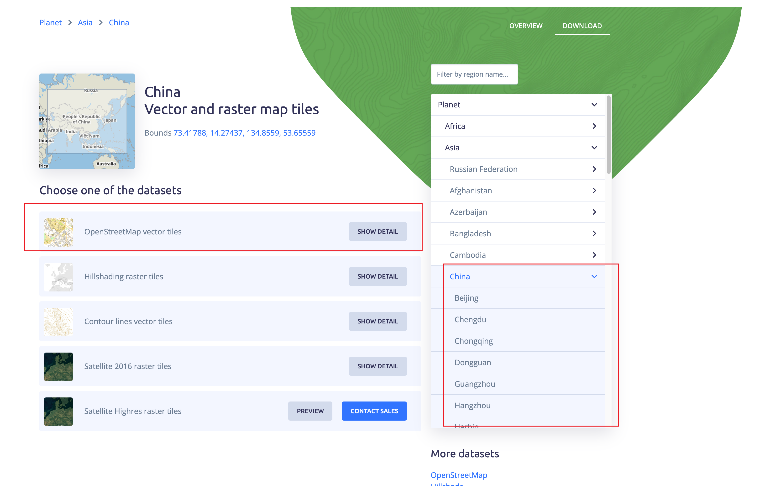
Go to MapTiler and download the map file for the region shown in the illustration.
Data Publishing - Command-Line Operation
On the server, follow these steps to view and update the map configuration:
View the current map configuration:
k3s kubectl get cm es-management-mapconfig -n flighthub2 \
  -o jsonpath='{.data.map_config\.yaml}'
Prepare a new configuration file based on the current configuration. Then run the following commands to update the configuration and restart the service so that the changes take effect:
# ① 用新配置文件覆盖更新,将 /path/to/new_map_config.yaml 替换为真实文件路径 k3s kubectl patch cm es-management-mapconfig -n flighthub2 --type merge \ -p "$(jq -Rs '{data: {"map_config.yaml": .}}' /path/to/new_map_config.yaml)" # ② 重启服务,使新配置生效 k3s kubectl rollout restart deploy/es-management -n flighthub2/path/to/new_map_config.yamlis the actual path to the new configuration file. Use the configuration output in step 1 as a starting point, edit it, and save the file. Thear_resourcesection configures AR map resources. An example configuration is shown below:map_resource: - name: 本地卫星地图 type: default street_link: link: http://47.98.53.122:30814/services/satellite-2017-11-01-china_shenzhen/tiles/{z}/{x}/{y}.jpg - name: 本地卫星地图+mbtiles路网 type: custom street_link: http://47.98.53.122:30814/services/street_osmtest_shenzhen_mbtiles_v3_level15/tiles/{z}/{x}/{y}.png link: http://47.98.53.122:30814/services/satellite-2017-11-01-china_shenzhen/tiles/{z}/{x}/{y}.jpg min_z: 0 max_z: 13 - name: 在线 link type: custom street_link: https://mt1.google.com/vt/lyrs=h&x={x}&y={y}&z={z}&hl=zh-CN link: https://mt1.google.com/vt/lyrs=s&x={x}&y={y}&z={z}&hl=zh-CN ar_resource: - name: AR 标注地图 type: custom min_z: 0 max_z: 14 link: https://${SERVICE_DOMAIN}:${MAP_SERVER_TCP_PORT}/services/{mbtiles_file_name}/tiles/{z}/{x}/{y}.pbf
Note:
- link concatenation rule: If the mbtiles file is named
osm-2020-02-10-v3.11_china_shenzhen.mbtiles, the resulting path is:
${SERVICE_DOMAIN}:${MAP_SERVER_TCP_PORT}/services/osm-2020-02-10-v3.11_china_shenzhen/tiles/{z}/{x}/{y}.pbf
Attention: The map data downloaded from MapTiler in this section is an MBTiles file, with tiles in PBF format.