
MBTiles Format Map Tiles
Data Acquisition
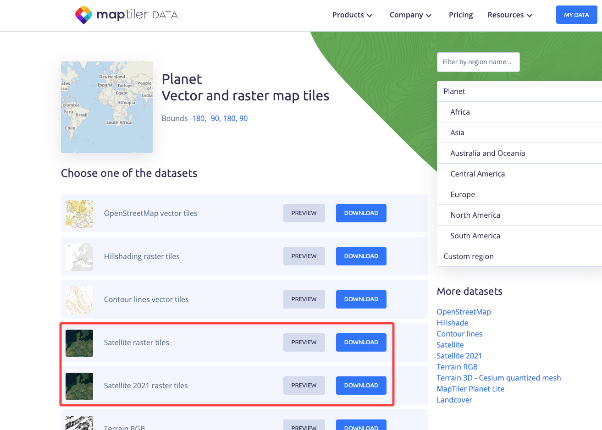
Go to 「MapTiler」 and download a tile map file of the type shown in the image.
Note:
- Use QGIS to create MBTiles data packages from raster (TIF) data in the WGS84 (EPSG:4326) or Web Mercator (EPSG:3857) coordinate system. Other command-line tools or GIS client software can also be used.
- Some online map data sources may have coordinate offsets. Verify the coordinate accuracy of the selected data source.
Data Publishing - Visualized Operation
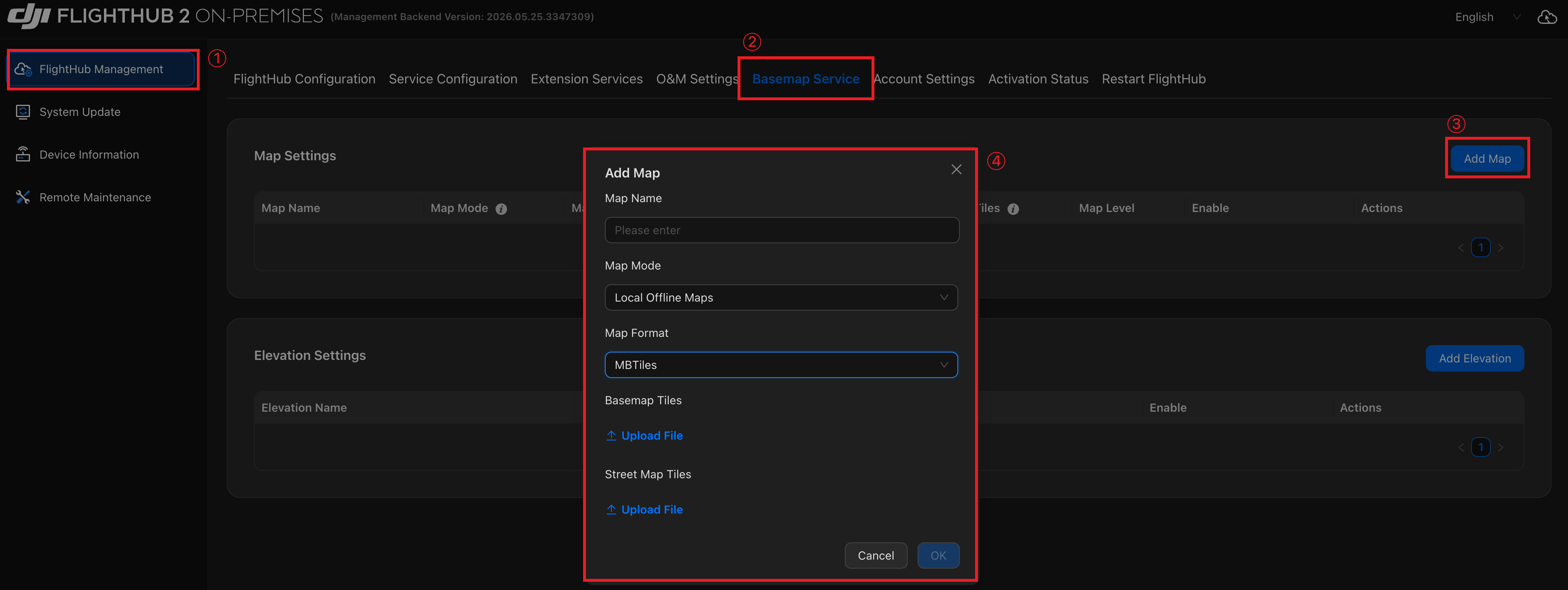
Log in to the Admin Console and follow these steps to add a map:
- Go to 「FlightHub Management」→「Basemap Service」→「Add Map」.
- Set 「Map Mode」 to "Local Offline Maps".
- Set 「Map Format」 to "MBTiles".
- Upload the tile files and click 「OK」.
Tip: For instructions on logging in to the Admin Console, see "Accessing the AIO Admin Console".