
About the DJI FlightHub 2 Cluster
Overview
Starting with V2.0, FlightHub 2 On-Premises uses a Cluster architecture that supports High Availability, Load Balancing, and Disaster Recovery to meet the needs of larger-scale flight operations. Visual operations and fewer deployment environment dependencies reduce deployment and maintenance costs.
You can deploy a single Node first, then expand as business needs grow. With 3 or more Nodes, the Cluster provides the following capabilities:
- High Availability: Automatic failover when a Node fails keeps core services running.
- Load Balancing: Tasks are allocated according to Node resources to prevent individual servers from being overloaded.
- Disaster Recovery: Multiple backup copies reduce data loss and downtime.
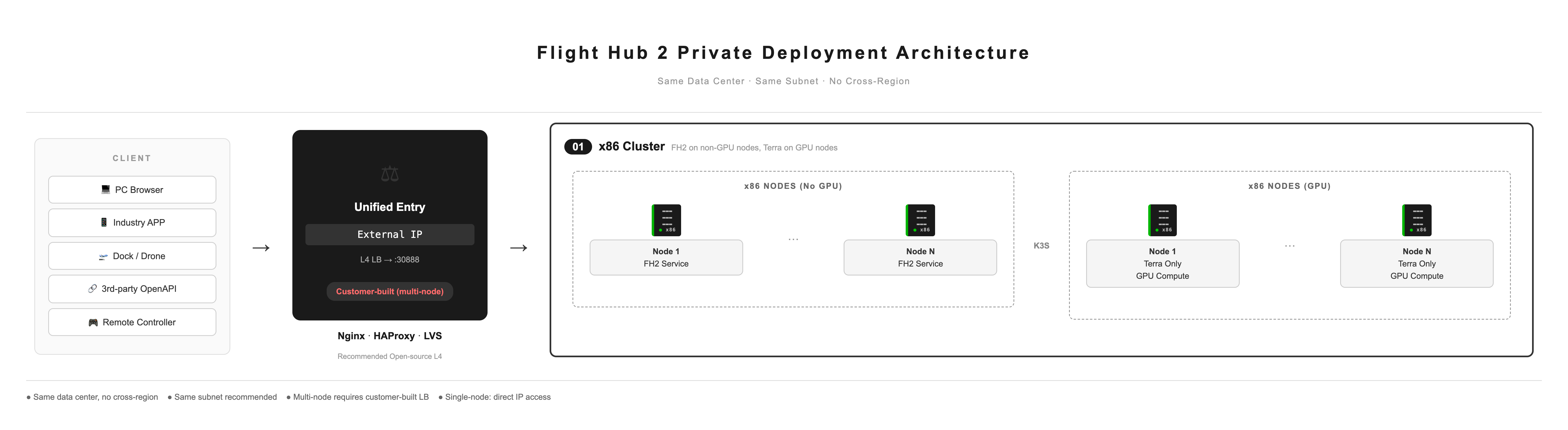
Deployment Process Overview

- First Node deployment: See “Quick Start”.
- Node Expansion: See “Node Management”.
- Upgrading V1.7.1 and earlier versions to V2.0: See “Upgrading Historical Versions to V2.0”.
Deployment Constraints
- All Nodes must be deployed in the same server room. Cross-region deployment is not supported.
- Deploying all Nodes on the same subnet is recommended.
- For multi-Node Clusters, configure Load Balancing (LB) yourself to provide a unified access endpoint. For best practices, see the Operations and Maintenance Documentation.
Supported Deployment Configurations
| Configuration | Architecture | Node Count | Deployed Services | Description |
|---|---|---|---|---|
| All-x86 Cluster | x86_64 (Intel / AMD) | 1–N Nodes | All DJI FlightHub 2 + Terra services | All services are deployed on x86 Nodes |
Load Balancing
Multi-Node Clusters must have Load Balancing configured to provide a unified access endpoint (VIP) and distribute traffic to port 30888 on each Node.
An L4 Load Balancing solution is recommended. For configuration best practices, see the Operations and Maintenance Documentation.
Single-Node deployments can be accessed directly using the Node IP address and do not require LB.
Key Differences from Historical Versions
License installation: DJI FlightHub 2, 4G, and Terra Licenses must be installed on the same Authorization Node. If your Licenses are installed on separate machines, contact after-sales support to migrate them before upgrading to V2.0.
- First use trial Licenses to verify service stability after migration. Migrate production Licenses only after confirming that migration succeeded and services are running stably.
Upgrade method: V1.7.1 and earlier versions cannot be upgraded directly to V2.0 using the previous visual or command-line upgrade methods. Follow “Upgrading Historical Versions to V2.0” to perform the migration.
Data backup: Backup commands and procedures have changed. Follow the relevant chapters in this manual.
Routine operations and maintenance: Maintenance commands, service log export methods, and the port list have been updated. See the relevant chapters in this manual.
Feature changes: Remote operations and maintenance, login page customization, and alert rule modification are temporarily unavailable.