
Configuration Guide
Go to "Extended Services" in the Admin Console, enter the SMTP configuration, and save it.
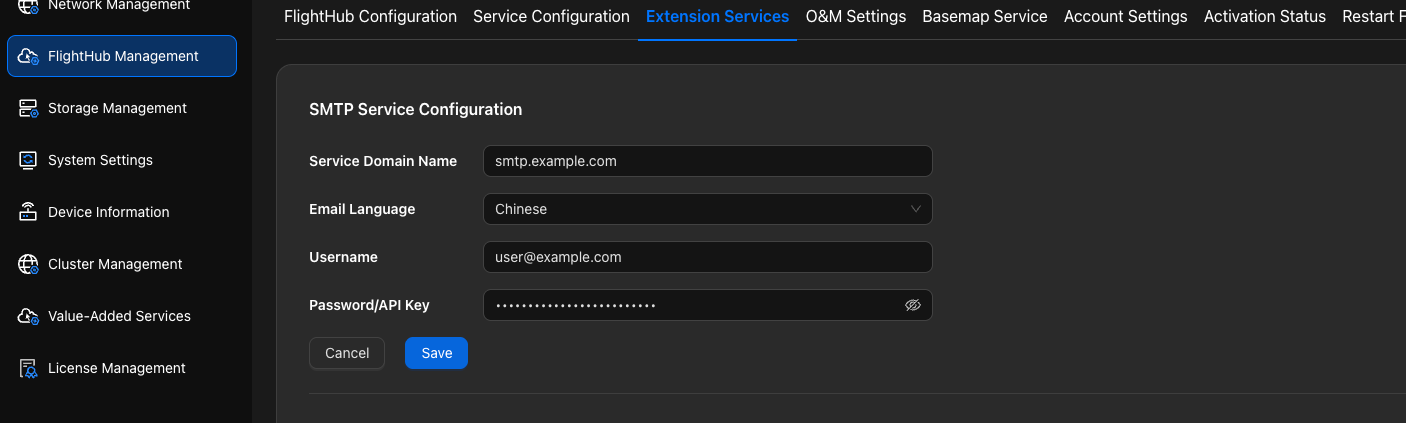
- Service Domain: The SMTP relay service address (such as
smtp.company.comorsmtp.mailgun.org). - Username: The username for SMTP authentication (commonly an email address, such as
noreply@your-domain.comorpostmaster@your-domain.com). - Password/API Key: The SMTP authentication password or an API/app-specific password.
- Email Language: Select the language of the alert emails you want to receive:
cn(Chinese) oren(English). The system skips alert emails whose language does not match this setting.
Configuration by SMTP Service Source
You Already Have an Internal Corporate SMTP Relay
Obtain the following from your email/IT administrator:
- SMTP host address (such as
smtp.company.com) - Authentication account and password (an "app-specific password" may need to be enabled)
- Recommended port and encryption method (commonly 587 + STARTTLS or 465 + TLS)
- SMTP host address (such as
Enter the following configuration in "Extended Services" in the Admin Console:
- Service Domain=the provided SMTP host
- Username=your sender account (a functional account such as
noreply@your-domain.comis recommended) - Password/API Key=the corresponding password/app-specific password
Email Language=cnoren
You Do Not Have an SMTP Relay (Using Mailgun as an Example)
Mailgun supports sending emails from verified domains and provides SMTP access.
Register and log in to Mailgun, and select a suitable region and plan.
Add the domain you want to send from (such as
your-domain.com):- Follow the wizard to add SPF, DKIM (required), and optional MX, tracking CNAME, and other records at your DNS provider.
- Wait for DNS propagation and complete domain verification in the Mailgun control panel. For detailed steps, see "Adding and Verifying a Sending Domain in Mailgun".
Create/Obtain SMTP credentials:
- Host:
smtp.mailgun.org - Username: Usually
postmaster@your-domain.com(or the SMTP user you created in Mailgun) - Password: Generate/view it in the control panel.
- Host:
Enter the following configuration in "Extended Services" in the Admin Console:
- Service Domain:
smtp.mailgun.org - Username=
postmaster@your-domain.com(or your sender account) - Password/API Key=
<在 Mailgun 控制台复制的密码> - Email Language=
cn(oren)
- Service Domain:
Verify email sending:
- Trigger a test email, for example by triggering an alert in the system or testing with existing operations and maintenance tools.
- If you do not receive the email, see "Troubleshooting (FAQ)".
Naming Suggestion
It is recommended to use noreply@your-domain.com as the sender email address. When using Mailgun, a common practice is to use postmaster@your-domain.com as the authentication account and noreply@your-domain.com as the actual From address.